
- If you’ve ever worked in a company that uses both SAP and Salesforce, you probably know the pain: duplicate data, disconnected teams, and slow decision-making. In 2025, as digital transformation accelerates, integrating these two powerhouse platforms isn’t just a technical upgrade—it’s a strategic necessity.
Whether you’re a business user, team leader, or someone just starting your Salesforce or SAP journey, understanding the fundamentals of SAP + Salesforce integration will set you up for long-term success.
Let’s break it down, explore the challenges, and show you how to start strong—even if you’re a total beginner.
🔍 What Is SAP + Salesforce Integration?
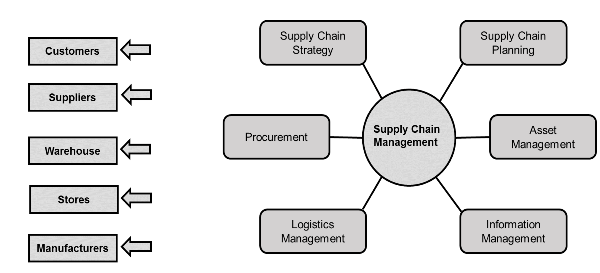
At a high level, SAP manages internal processes like finance, supply chain, and inventory, while Salesforce manages customer-facing processes like sales, service, and marketing.
Integrating them means:
- Seamless data flow between backend operations (SAP) and front-end systems (Salesforce)
- Eliminating manual data entry and the errors that come with it
- Enabling real-time customer insights and faster decision-making
In simple terms? Integration helps your business run like a well-oiled machine—front to back.
📈 Why SAP + Salesforce Integration Matters in 2025
The world isn’t slowing down—and neither is your customer’s expectation for real-time, personalized experiences.
🌍 Key Market Trends:
- AI and Automation Require Unified Data
Without integrated systems, automation breaks. AI can’t work with siloed data. - Rise of Omnichannel Commerce
Customers interact with businesses across web, mobile, in-store, and service portals. Without synced data, these touchpoints become fragmented. - Global Supply Chain Pressure
Companies need to move fast—especially in industries like manufacturing, logistics, and retail. Integration ensures supply data in SAP aligns with real-time sales updates in Salesforce.
🧩 Top Integration Challenges in 2025
❌ 1. Complex Data Structures
SAP uses structured, highly detailed records. Salesforce is more flexible and user-focused. Matching the data between them is a challenge.
❌ 2. Real-Time Syncing
Many businesses still rely on batch data transfers. But in 2025, real-time syncing is the gold standard. Delayed updates mean missed opportunities.
❌ 3. High Customization
Both SAP and Salesforce are highly customizable—but that can complicate integration. Custom fields, rules, and workflows must be carefully mapped.
❌ 4. Security & Compliance
Data privacy is non-negotiable. Integration must respect compliance requirements like GDPR, HIPAA, and industry-specific mandates.
✅ Proven Solutions That Work
Good news—companies have cracked the code with these tried-and-true solutions:
🔄 1. Use Middleware Tools
Platforms like MuleSoft (a Salesforce company), Dell Boomi, and SAP BTP Integration Suite help bridge the gap between SAP and Salesforce without the need for deep custom code.
🔗 2. Define a Unified Data Model
Before integration, align both systems on common data definitions. What does a “customer” or “order” mean in SAP vs. Salesforce? Document this clearly.
🧠 3. Start Small, Then Scale
Begin with high-impact integrations—like syncing order status, customer master data, or inventory levels. Then gradually expand to complex workflows.
🔐 4. Prioritize Security by Design
Use encryption, role-based access, and audit logs. Partner with IT to ensure integrations meet internal security policies and external regulations.
💼 Real-World Example: From Chaos to Clarity
Scenario: A global electronics manufacturer uses SAP for ERP and Salesforce for CRM. Before integration:
- Sales teams couldn’t see real-time inventory
- Orders were delayed due to manual coordination
- Finance had no visibility into sales pipeline data
After integration using MuleSoft:
- Sales reps could instantly check stock availability and generate accurate quotes
- Orders flowed directly into SAP for fulfillment and invoicing
- Leadership had a real-time dashboard combining sales + finance metrics
Result? 25% faster order processing and a 40% drop in billing errors.
🛠️ Tips for Beginners: How to Start Strong
Even if you’re not a developer or system architect, you can play a key role in your company’s integration journey:
✔️ 1. Learn the Language
Familiarize yourself with terms like APIs, data mapping, middleware, and event-driven architecture.
✔️ 2. Document Business Processes
Understand how data flows in your department and where the disconnects are. This insight is gold for IT teams designing integrations.
✔️ 3. Collaborate Across Teams
Integration is not just IT’s job. Involve sales, finance, service, and operations teams from day one.
✔️ 4. Leverage Trailhead and Learning Hubs
Salesforce’s Trailhead and SAP’s Learning Hub offer free and low-cost resources to help you get started—no prior experience required.
💪 Why This Matters for Your Career
Understanding SAP + Salesforce integration gives you a major edge in today’s job market.
Businesses are actively looking for professionals who:
- Bridge the gap between business and IT
- Speak both SAP and Salesforce fluently
- Drive digital transformation from the ground up
Whether you’re in sales, operations, finance, or IT—this skillset can make you a critical player in your company’s digital evolution.
🎓 Ready to Dive Deeper?
If you’re serious about learning how to design, support, or lead SAP + Salesforce integrations, we’ve got the perfect next step.
👉 Explore our expert-led courses on Salesforce Integration & SAP Architecture.
Learn how to:
- Map SAP data structures to Salesforce
- Use MuleSoft or SAP BTP for seamless connectivity
- Design secure, scalable, and real-time integrations
These practical, real-world courses are built for learners of all levels—especially beginners.
🔚 Final Thoughts
In 2025, SAP + Salesforce integration is no longer optional—it’s a strategic must-have.
It’s what enables faster decisions, better customer experiences, and smarter businesses. And now, you know the fundamentals.
So whether you’re aiming to upskill, improve your team’s workflow, or just understand how these systems talk to each other, your journey starts here.
YOU MAY BE INTERESTED IN
ABAP Evolution: From Monolithic Masterpieces to Agile Architects
A to Z of OLE Excel in ABAP 7.4
Upgrade Your Business: Top SAP Business One Partners in Mumbai
The Value of Independent Third-Party Content
Crafting Success: Essential FAQs for Aspiring Salesforce Developers